AI Age Filter — See What You Look Like Older, Free
Preview natural aging by adding 10, 20, 30 or 40 years to a portrait. Sign in for starter credits; photos remain private and access expires within 24 hours.
How Our AI Age Filter Works
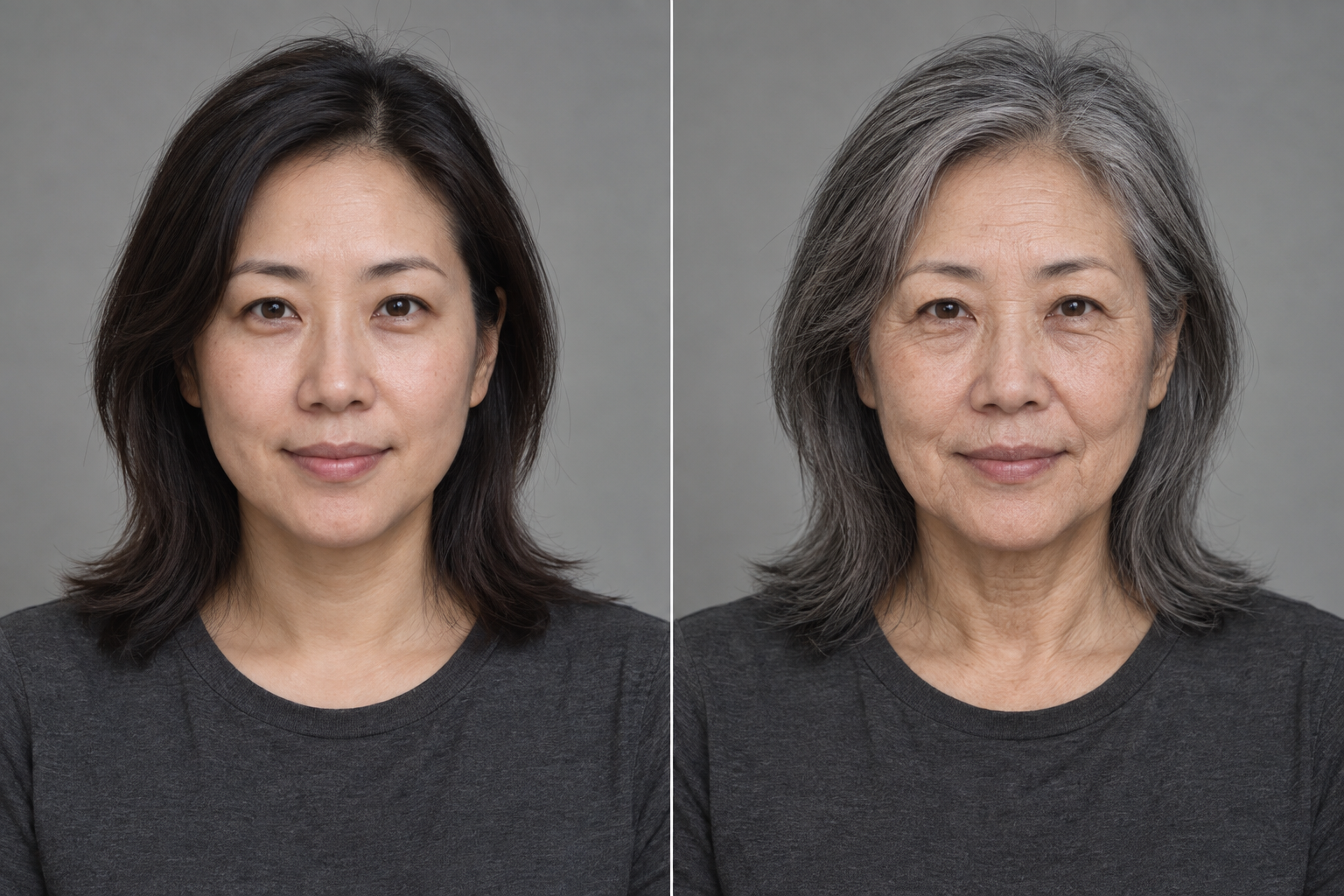
Our AI age filter uses image-to-image AI models to simulate natural aging. Instead of warping your photo with a cartoonish overlay, the model re-renders your face with age-appropriate changes — fine lines, graying hair, softer contours — while preserving your identity, expression and style. The result looks like a photo of you, a few decades later.
Age Filter Your Photo in 3 Steps
1. Upload a photo
Choose a clear, front-facing portrait of a consenting adult. Selecting the photo gives a local preview. It is uploaded only when you agree to processing and press Generate.
2. Choose years to add
Add 10, 20, 30 or 40 years to the appearance in your photo. All four options ask for further aging, even for an older adult; none asks to turn someone into a younger age group.
3. Get your older self
The result appears after generation and private storage finish. Compare it with your input and download the copy labelled AI-generated. Processing time varies; this is an artistic simulation.
Photo Ager: Turn Any Photo Old
Looking for a photo ager that goes beyond a wrinkle sticker? The same tool works as a general photo ager: any portrait becomes a version of itself aged by decades, with believable skin texture and hair changes. Try a photo ager free with starter credits — no app download required.
Free vs Paid Aging Filters
Create an account to receive starter credits and see the per-generation cost before submitting. Free and paid credits use the same default model and privacy controls. You do not need an app subscription to begin. If purchases are unavailable, the tool clearly reports insufficient credits rather than sending you to an unconfigured checkout.
Choose a Photo That Keeps You Recognizable
Start with one adult in a clear, front-facing portrait. Soft, even lighting makes it easier to see the eyes, cheeks and skin texture that help distinguish one person from another. Avoid a tiny face in a crowded scene, heavy sunglasses, strong beauty filters or a photograph that has already been aged. The first version accepts JPG, PNG and WebP files up to 10 MB. Choosing a file gives you a local preview; uploading begins when you confirm consent and click Generate. If you decide to use a different portrait, the consent checkbox resets so you can check permission for that particular image. Use your own photo, or ask the adult shown for permission before trying their picture. This is a personal creative experiment, and respectful use begins with the source photograph.
Compare Additional Years, Not a Target Birthday
The four settings add approximately 10, 20, 30 or 40 years to the appearance in your input. They are creative directions rather than measurements of your age. A person who already looks older is still asked to become older; choosing +10 does not ask the model to turn that person into a ten-year-old. Start with a smaller increment if you want to inspect subtle changes, then use a larger increment for a more pronounced interpretation. Each generation creates one separate image and uses the credit amount shown by the tool. Compare the face with the original before sharing: recognizable eyes, nose and proportions matter more than the number of wrinkles. The model can change details unexpectedly, and additional years cannot be verified from the picture alone. A strong result should be understandable as an illustration of the same adult.
Know What Happens to Your Portrait
Your input and result are private to your account in this application. The image model runs through an external inference service, so generation requires sending your portrait to that service after consent. We use temporary reference access instead of putting your face in a public gallery. For Age Filter files in our storage, cleanup starts at hour 23 and retries automatically; access ends 24 hours after upload even if a storage deletion needs another attempt. Save a result you want to keep before that deadline, and remember that a downloaded copy belongs to your device and is outside this cleanup process. These controls describe our application and storage. They do not establish how long every external processor retains data. Read the privacy policy before uploading sensitive material, and choose whether that processing fits your expectations.
Use an Aging Preview as a Creative Illustration
An AI portrait can be convincing without describing a real future. One photograph does not reveal how your health, habits, environment or preferences will change over the coming decades. The preview may exaggerate gray hair, miss distinctive features or keep a hairstyle you will eventually change. It cannot assess someone’s health, establish identity or support an official investigation. Look at the result with that uncertainty in mind and keep the AI-generated label when posting it. The first release is intended for consenting adults aged 18 and over; do not upload minors or another person without permission. If the model rejects a request or the task fails, the system records the failure and queues a refund of the site credits it actually charged. A temporary refund problem stays pending for another attempt.
An Illustrative Before and After
Frequently Asked Questions
How accurate is the AI age filter?
The filter produces a realistic simulation of how facial features typically age, but it cannot predict your actual future appearance — lifestyle, genetics and environment all play a role. Treat the result as entertainment, not a forecast.
Is my photo safe?
Age Filter photos are private. Access expires within 24 hours, with automatic deletion starting earlier and retries for storage failures. We do not publish inputs or use them to train models. The privacy policy explains the third-party inference service and its separate retention terms.
Do I need to download an app?
No app installation is needed. You use the website in your browser, while an AI service processes the photo after consent and submission.
Is the AI age filter free?
New accounts receive starter credits to try the tool. Each generation shows its credit cost. Additional purchases are available only when checkout is configured; the initial credits do not require a payment method.
Explore Image Prompts
Browse public creative examples and prompts. Your private Age Filter portraits and results are never added to this gallery.